
建站日志
记录博客搭建过程

流水账更新日志
2020年9月
2020年9月26日
- 关于9 月 13 日的问题,今天修改了一下 jQuery, 把用于折叠代码的按钮从 <code> 元素的 sibling 移到了 child 的位置, 并相应地修改 css
/* 添加.children('code:first-child()') */
$('.fold').each(function() {
  $(this).children('code:first-child()').prepend("<button class=\"showopt s\">"+ angle_down + "  Show Code</button>");
})- 调整后的效果如下:
set.seed(1)
x = rnorm(200)
summary(x)
hist(x, bins = 15)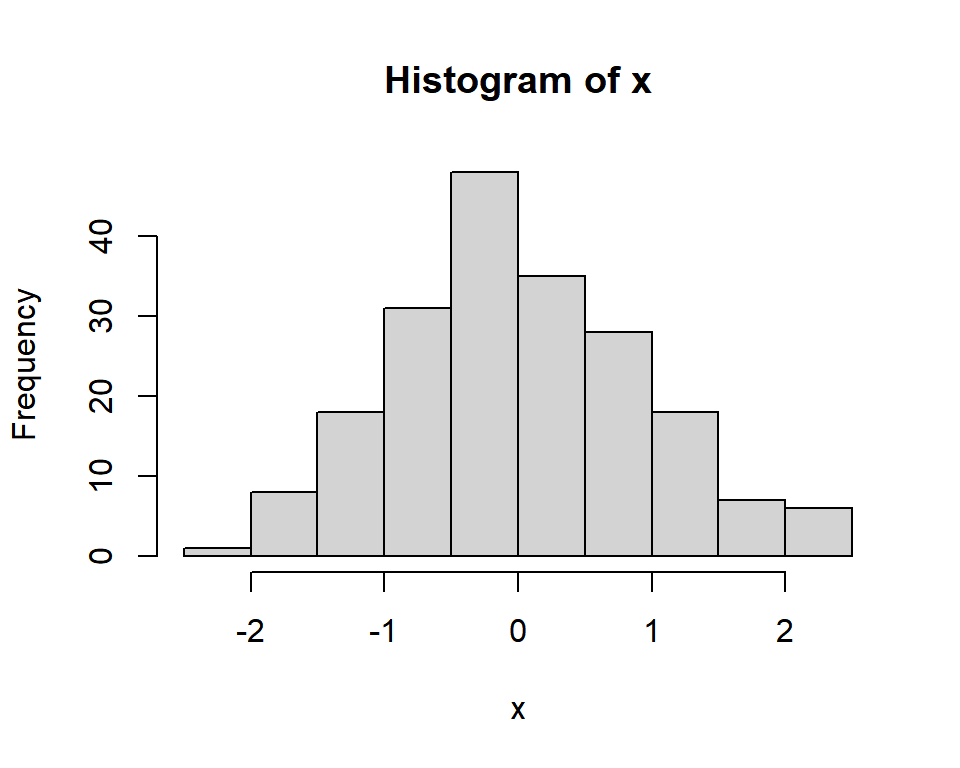
##     Min.  1st Qu.   Median     Mean  3rd Qu.     Max.
## -2.21470 -0.61383 -0.04937  0.03554  0.61300  2.40162
2020年9月25日
- 添加了 shortcode
collapse_button.html,用于控制 Bootstrap 的 Collapse 组件
blogdown::shortcode("collapse_button", id = "example")<div class='collapse' id='example'>
<blockquote>
In a hole in the ground there lived a hobbit...
</blockquote>
</div>Opening paragraph of The Hobbit
In a hole in the ground there lived a hobbit. Not a nasty, dirty, wet hole, filled with the ends of worms and an oozy smell, nor yet a dry, bare, sandy hole with nothing in it to sit down on or to eat: it was a hobbit-hold, and that means comfort.
2020年9月14日
- 添加了Archive页
2020年9月13日
- 在移动端查看时,用于折叠代码的按钮的上端超出了代码框。折腾了半天css也没有解决,改天再说

2020年9月12日
- 把 Magnific Popup 替换成了 Fancybox1,原因是 Magnific Popup 没有双击放大功能,只能 pinch to zoom, 而且会连带背景里的网页一起放大。还尝试过 Photoswipe 和 lightGallery,比较了一下觉得Fancybox要简洁一些
- 给网站添加了favicon
- 更改
config.toml中的参数
[params.meta] favicon = true svg = true faviconVersion = "1"- 用 TailorBrands 随便做了个icon
- 用 Favicon Generator 生成favicon
- 下载压缩包后解压至
static/favicon目录下(需要deploy之后才能看到效果)
- 更改
2020年9月11日
- 还是iOS设备页面过宽的问题,今天终于找到了终极解决方法:添加如下css
#site-main {
   max-width: 100vw;
}- 其实这也算不上什么好方法,只是把页面强行调到viewport宽度的100% (vw = viewport width)。我用的主题 Hugo Future Imperfect Slim 之前出过类似的问题 (Issue #18), 但貌似今年7月的时候就已经解决了,我最近也更新过主题,不知道为什么还会这样。推测是 footer 引起的。
- 今天又对着已经publish了的网站调了半天css… 最近脑子越来越不好使了
2020年9月7日
- 网易云外链经常加载失败,想了想还是全部换源到Spotify了。写了个shortcode
music_spotify.html
2020年8月
2020年8月29日
- 测试兼容性的时候发现在iPhone 6/7/8上查看时页面过宽(见下图);解决方法是将viewport meta tag中的
initial-scale设置为0.862:
<meta name="viewport" content="width=device-width, initial-scale=0.86">
Suppress the small zoom applied by many smartphones by setting the initial scale and minimum-scale values to 0.86. The result is horizontal scroll is suppressed in any orientation and the user can zoom in if they want to.
- 将
layouts/_default/terms.html(即Categories和Tags页面)的header从h1更改为h2并调整页边距
2020年8月28日
- 翻看7月的博文时发现代码块没有高亮,所有文字都显示为深红色(即行内代码的颜色)。将
config.toml里的highlightjsTheme一项由“Xcode”修改为“xcode”后恢复正常。印象中highlightjsTheme本来不是大小写敏感的,难道是因为我前几天更新了一下blogdown? - 更改
i18n/zh-CN.toml中的[date_format],使日期以中文格式显示
[date_format]
  other = "2006年1月2日"
2020年8月27日
- 在Netlify上Deploy的时候报错:
折腾了半天之后发现是写
layouts/partials/mastodon.html的时候在同一目录下放了一个测试版本test.html,后来忘记删除了…
.png)
- sidebar里的mini-post顶部图片尺寸显示不正常(见下图);解决方法是添加如下几行css
.mini-post section .image img {
    height: unset;
}.jpg)
- 今天链接图片的时候又忘加leading slash了(不加leading slash会变成relative path)… 我这脑子要什么时候才能长记性
2020年8月3日至23日
- 断断续续地修改Look, I Made Some Charts
2020年8月2日
- 在
layouts/partials/scripts.html中添加以下代码以显示数学公式(代码参考及原理见The Best Way to Support LaTeX Math in Markdown with MathJax3)
<script src="//yihui.org/js/math-code.js"></script>
<script id="MathJax-script" async
        src="https://cdn.jsdelivr.net/npm/mathjax@3.0.5/es5/tex-mml-chtml.js">
</script>- 添加以下代码,使目录可折叠/展开(效果见本文目录)
- 识别嵌套式列表,移除bullet points并添加icon
- 展开过程中icon会从“”变为“”
- 注意在css中设置
.fa-angle-right, .fa-angle-down {position: absolute;}, 否则后方文字会因icon宽度变化而发生位移 - 列表条目超过5项时自动折叠
/* JavaScript */
(function($) {
    $(document).ready(function() {
        $toc_fold = $("#TOC li");
        $toc_fold.has('ul', 'ol').prepend("<div class=\"showtoc\"><i class=\"fa fa-angle-right\" aria-hidden=\"true\"></i></div>");
        $toc_fold.has('ul', 'ol').css("list-style", "none");
        $toc_fold.children('ul').attr('class', 'toc_folded');

        // collapse if has more than 5 elements in the list
        $('.toc_folded').each(function(){
            $count = $(this).children('li').length;
            if($count > 5) {
                $(this).css("display", "none");
            }
        });

        $(".showtoc").click(function(){
            var label = $(this).html();
            if (label.indexOf("fa-angle-right") >= 0) {
                $(this).html(label.replace(
                    "fa-angle-right", "fa-angle-down"));
            } else {
                $(this).html(label.replace(
                    "fa-angle-down", "fa-angle-right"));
            }
            $(this).siblings('ul', 'ol').slideToggle('300', 'swing')
        });
    });
})(jQuery);
2020年8月1日
- 添加折叠代码按钮4 (代码和效果见下方代码块)
```{r, class.source="fold s"} CODE HERE```:折叠代码```{r, class.source="fold o"} CODE HERE```:折叠输出结果```{r, class.source="fold s o"} CODE HERE```:折叠代码和输出结果
/* JavaScript */
(function($) {
    $(document).ready(function() {

      var angle_down = "<i class=\"fa fa-angle-down\" aria-hidden=\"true\"></i>";
      var angle_up   = "<i class=\"fa fa-angle-up\" aria-hidden=\"true\"></i>";

      $chunks = $('.fold');

      $chunks.each(function() {
        // add button to source code chunks
        if ( $(this).hasClass('s') ) {
          $(this).prepend("<div class=\"showopt s\">"+ angle_down +
                          "  Show Code</div><br style=\"line-height:22px;\"/>");
          $(this).children('code').attr('class', 'hljs folded');
        }

        // add button to output chunks
        if ( $(this).hasClass('o') ) {
          $(this).has('code').prepend("<div class=\"showopt o\">" + angle_down +
                          "  Show Output</div><br style=\"line-height:22px;\"/>");
          $(this).children('code').addClass('folded');

          // add button to plots
          $(this).find('.image-link').wrap('<pre class=\"plot\"></pre>');
          $('pre.plot', this).prepend("<div class=\"showopt plot\">"+ angle_down +
                          "  Show Plot</div>");
          $('pre.plot', this).children('img').addClass('folded');
        }
      });

      // show only the first line of the chunk when document is loaded
        $('.folded').css('height', '2.2em')
        $('.folded').css('overflow-y', 'hidden')

      // function to expand/collapse the chunk when click
      $('.showopt').click(function() {
        var label = $(this).html();
        if (label.indexOf("Show") >= 0) {
          $(this).html(label.replace(angle_down + "  Show",
                                     angle_up   + "  Hide"));
          $(this).siblings('code, img').animate({height: "100%"}, 400);
          $(this).siblings('code, img').css("overflow-y", "visible");

        } else {
          $(this).html(label.replace(angle_up   + "  Hide",
                                     angle_down + "  Show"));
          $(this).siblings('code, img').animate({height: "2.2em"}, 400);
          $(this).siblings('code, img').css("overflow-y", "hidden");
        }
        });
    });
})(jQuery);
/* css */
.showopt {
...
float: right;
position: relative;
bottom: -2.7em;
}
.showopt:hover {
...
cursor: pointer;
}
2020年7月
2020年7月30日
- 今天才发现主题自带的
highlight.js不支持R…从官网下载了一个支持R的版本 - 在
highlight.js里加入下方代码,防止highlight.js自动检测<pre>内的语言(Rmarkdown输出框的<code>标签没有class,但highlight.js会将它们识别为其他语言并高亮)5
hljs.configure({languages: []});2020年7月24日
- 将所有外部链接设置为点击后打开新标签页6
jQuery(document.links) .filter(
    function() { return this.hostname != window.location.hostname; }) .attr('target', '_blank');
2020年7月23日
- 添加按钮“分享到
.svg) ”(参考Mastodon Share Button并做了一些修改)
”(参考Mastodon Share Button并做了一些修改) - 在
config.toml里加载bootstrap.min.js- html:
- 添加了
layouts/partials/mastodon.html文件 - 在
layouts/_default/baseof.html中加入
<div id="mastodon-modal">{{ partial "mastodon" . }}</div>- 在
layouts/partials/mastodon.html中加入
{{ else if eq . "mastodon" }} <div class="mastodon-share-button" data-target="{{ $permalink }}" data-name="分享{{ $author }}的博文:{{ $title }}" data-buttonstyle="nav share-btn mastodon"> </div> - 添加了
- css:
css/modal.css - Javascript/JQuery:
js/mastodon.js
- html:
2020年7月22日
- 更改了404页面的外观
- 更改了文章阅读时长的计算方式7,按每分钟500字估算。之前的阅读时间是按英文阅读速度计算的,于是一篇5000多字的文章只用两分钟就能读完… 具体操作是在
layouts/_default/header.html中添加如下几行:
{{ $readTime := math.Ceil (div (countwords .Content) 500) }}

<!-- countwords只计算正文字符数,部分只有代码和标题的博文的阅读时长会估算成0分钟,
这里将最低阅读时长定义为1分钟 -->
{{ $readTime := cond (eq $readTime 0.0) 1.0 $readTime }}

<p>
<i class="fas fa-clock"></i>
阅读时长约{{ $readTime }} 分钟
</p>
2020年7月21日
- 添加了jQuery插件 Magnific Popup8,用于灯箱式 (lightbox) 图片浏览
- 目录外观调整(去掉部分目录的bullets等)
2020年7月20日
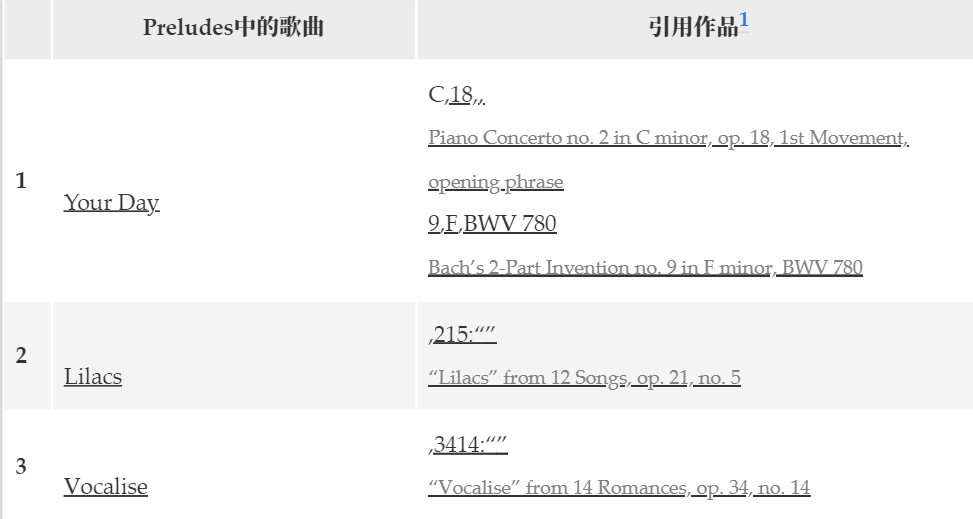
- Preludes那篇文章里的表格突然就不显示中文了(见下图),之前一直都是正常的,推测是因为我昨天更新了
knitr包… 最后的解决方法是在根目录下创建.Rprofile文件,并添加Sys.setlocale(locale = "Chinese")
2020年7月19日
- deploy error: 又折腾了一会儿,这回彻底放弃了,干脆重新建了个Repo从头做起,半小时搞定,总算能正常deploy了
- 添加了shortcode
music_163.html, 用于嵌入网易云音乐外链播放器 - 于是顺手换掉了Assassins那篇文章里的外链
2020年7月18日
- deploy error: 折腾了两个多小时后无果,发现有人遇到了同样的问题(#Issue 166),蹲个解答
- 在根目录下创建了
i18n文件夹,把theme/hugo-future-imperfect-slim/i18n/zh-CN.toml复制过来并修改了一下。原本的简中文件里有很多错译,还混了一堆繁体字 - 更换了博客的字体(参考了Yihui大神的代码)
- 解决了音频插入的问题
2020年7月17日
- 更改代码块外观:字体设为Consolas,
highlighjs主题设为Atom-One-Light,代码行间距设为1.5 - 更改行内代码块的字体和颜色
- 今天不知怎的Netlify突然就不能deploy了,报错如下:
Error running command: Build script returned non-zero exit code: 1折腾了半天都没解决,改天再说
2020年7月16日
- 继续更改外观
- 将博文预览页分类标签的
overflow参数修改为visible,避免标签因过长而折叠 - 更改blockquote和代码块的边框以及背景颜色
- 将博文预览页分类标签的
2020年7月15日
- 添加Staticman评论系统
- 编辑
exampleSite/static/css/add-on.css以更改外观- 限制博客预览页首行
- 缩小标题字体之间的间隔
- 缩小侧边栏minipost标题的外边距
Using the viewport meta tag to control layout on mobile browsers↩︎
The Best Way to Support LaTeX Math in Markdown with MathJax↩︎
Martin Schmelzer’s Answer: How to add code folding to output chunks in rmarkdown html documents↩︎
How to enable highlight.js for syntax highlighting of code blocks #5↩︎
How To Use The <a> To Make Links & Open Them Where You Want!↩︎
How to calculate the reading time of a Hugo string in minutes and seconds?↩︎